
The AI Copilot Built for
Siemens TIA Portal.
Understand inherited S7 logic, document undocumented function blocks, and generate new networks. Load your TIA Portal project files in, and start asking questions.
S7-1200 · S7-1500 · LAD & FBD & SCL
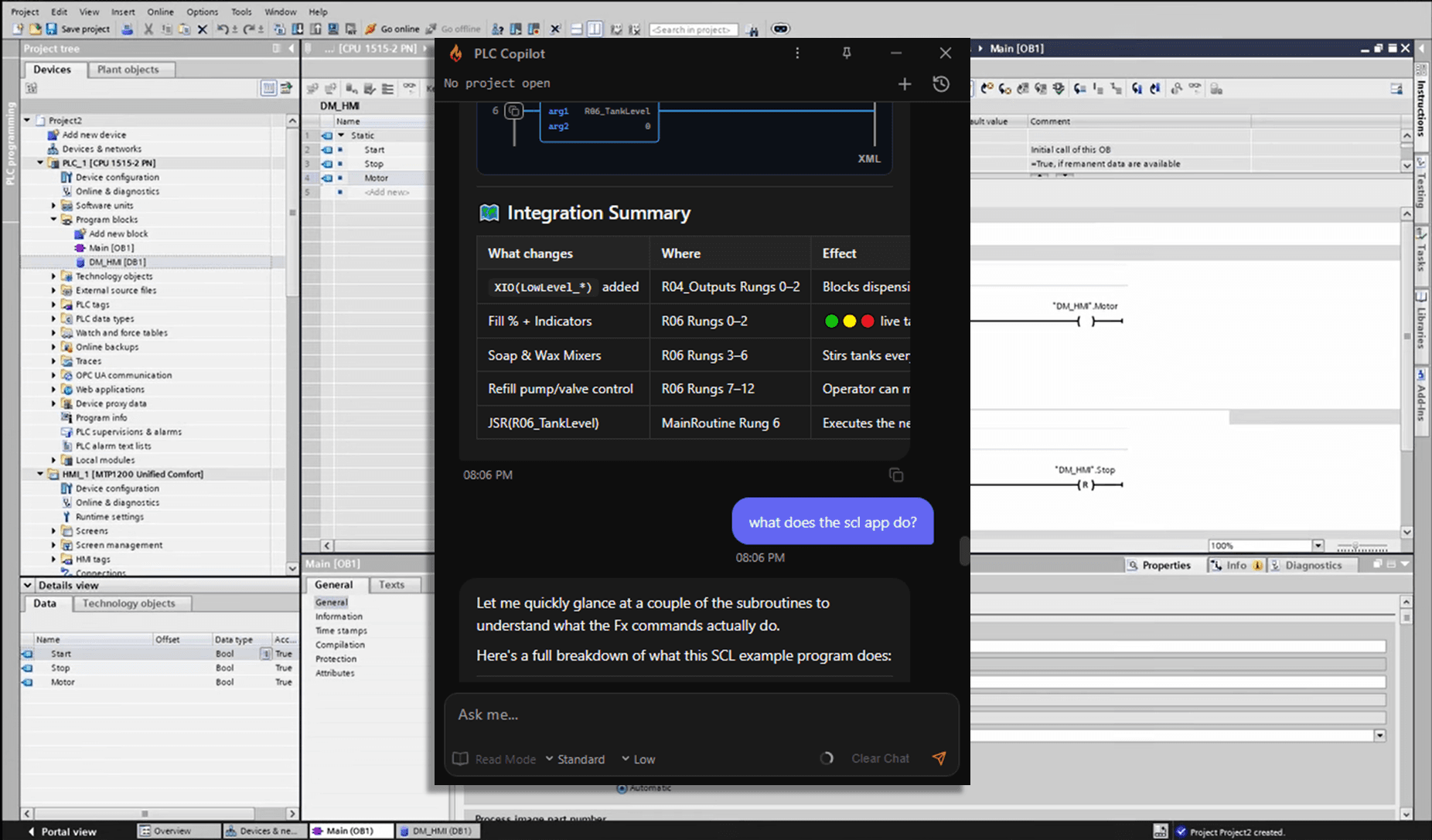
From project files
to answer.
Load your project
Connect PLC Copilot to your TIA Portal project export. It analyzes your data locally, reviewing relevant networks, tags, and blocks to answer your questions.
Ask in plain English.
Ask it the way you’d ask the engineer at the next desk. Anything about OBs, FBs, FCs, DBs, UDTs, tag tables, and cross-references.
Pump_2 is held OFF by an interlock at Rung 847.
Safety input I:3/12 (E-Stop bank 2) is de-energized. The latch on B3:4/2 will not clear until E-Stop is reset and Start_PB is pressed.
Get Answer. Apply.
Get answers tied to the exact network and tag. View LAD or FBD displayed in the chat, review PLC Copilot’s suggestions, and apply them in TIA Portal.
If you work in TIA Portal, this is for you.
Automation Engineers
Trace S7 faults in minutes instead of stepping through DB cross-references by hand. Get cited answers tied to the exact network and block without hunting through nested instance definitions.
Controls Engineers
Understand what an inherited function block actually does before you modify it. Document undocumented S7 projects without reviewing each block manually.
System Integrators
Get oriented in a new client's TIA Portal project on day one. Read what the logic does before you touch anything in the program.
Three ways it works inside your TIA Portal project.
Read what your S7 program actually does.
Open your TIA Portal project file and start asking questions. PLC Copilot reads across your blocks and DB cross-references and gives cited answers tied to the exact network and block.
- Explain what a function block does, parameter by parameter, without opening every nested instance DB
- Trace a fault condition back through the OB/FB/FC call stack to where it is set
- Find every network that reads or writes a specific DB variable or tag across the program
- Get oriented in an inherited S7 project before you change anything
Your PLC code
stays on your
local machine.
Offline and on-premises options are available. The online plans send chunks of your request to our servers where it is processed. See our Privacy Policy for more details on how we protect your proprietary information.
Private, for all plans
Ladder logic is proprietary. Often under NDA. No one, not even our team, can view or execute your source in context.
Secure by design
The AI works in an isolated local environment, communicating over an encrypted channel to ensure that your code remains private and secure.
Offline option available
Some teams prefer to use their own servers, some can't connect to the internet at all. We can accomodate your needs in our enterprise plan.
Local-first by default
Less time on the code. More time on the problem.
Follow a condition back through the call stack instead of stepping DB cross-references by hand.
Generate block and network documentation across an entire undocumented project without opening each definition.
Understand a TIA Portal project before you change a single network.
Download, open your TIA Portal project, and get your first cited answer.
“It just saved me a boat load of time trying to figure out how someone else's undocumented spaghetti works. Where in the past I would have probably trashed it and rewritten, now I can document the program so others can benefit.”
Controls Engineer, 25 Years of experience in automation
Interest from Siemens engineers came in well ahead of schedule. Opening access all at once would've meant a worse experience for everyone, so we're bringing teams on in batches. That way we can actually support each one properly. Join the waitlist and we'll reach out as spots open up.
You'll get a confirmation email right away. Access opens in batches, and when your spot comes up we'll reach out directly with setup instructions. No action needed in the meantime.
S7-1200, S7-1500, S7-300, S7-400, and ET 200SP CPU families. If your project can be exported from TIA Portal, you can load it.
LAD, SCL, and FBD networks are fully supported. Additional language support is in active development. If you have a specific requirement, get in touch and we'll let you know where it stands.
Your TIA Portal files are read locally on your machine and are never uploaded or stored on external servers. Queries are processed to return your answers. Enterprise plans include a fully offline, air-gapped option. Full details are in our Privacy Policy.
TIA Portal Copilot is built inside Siemens TIA Portal for only Siemens projects. PLC Copilot is a vendor-agnostic desktop app that loads exports from major PLC platforms, including TIA Portal, so you can explain, document, and draft logic on inherited or multi-vendor work without switching IDEs for every job.
Join the engineers already
on the list.
TIA Portal, SIMATIC, S7-1200, S7-1500, S7-300, S7-400, Step 7 Professional, and WinCC are trademarks of Siemens AG. PLC Copilot is an independent product and is not affiliated with, authorized by, or endorsed by Siemens AG.