
The Desktop AI Copilot for
Rockwell Studio 5000.
Explain rungs, add tag descriptions, generate ladder logic, and paste it straight into Studio 5000. Runs locally on Windows. Your .L5X files never leave your machine.
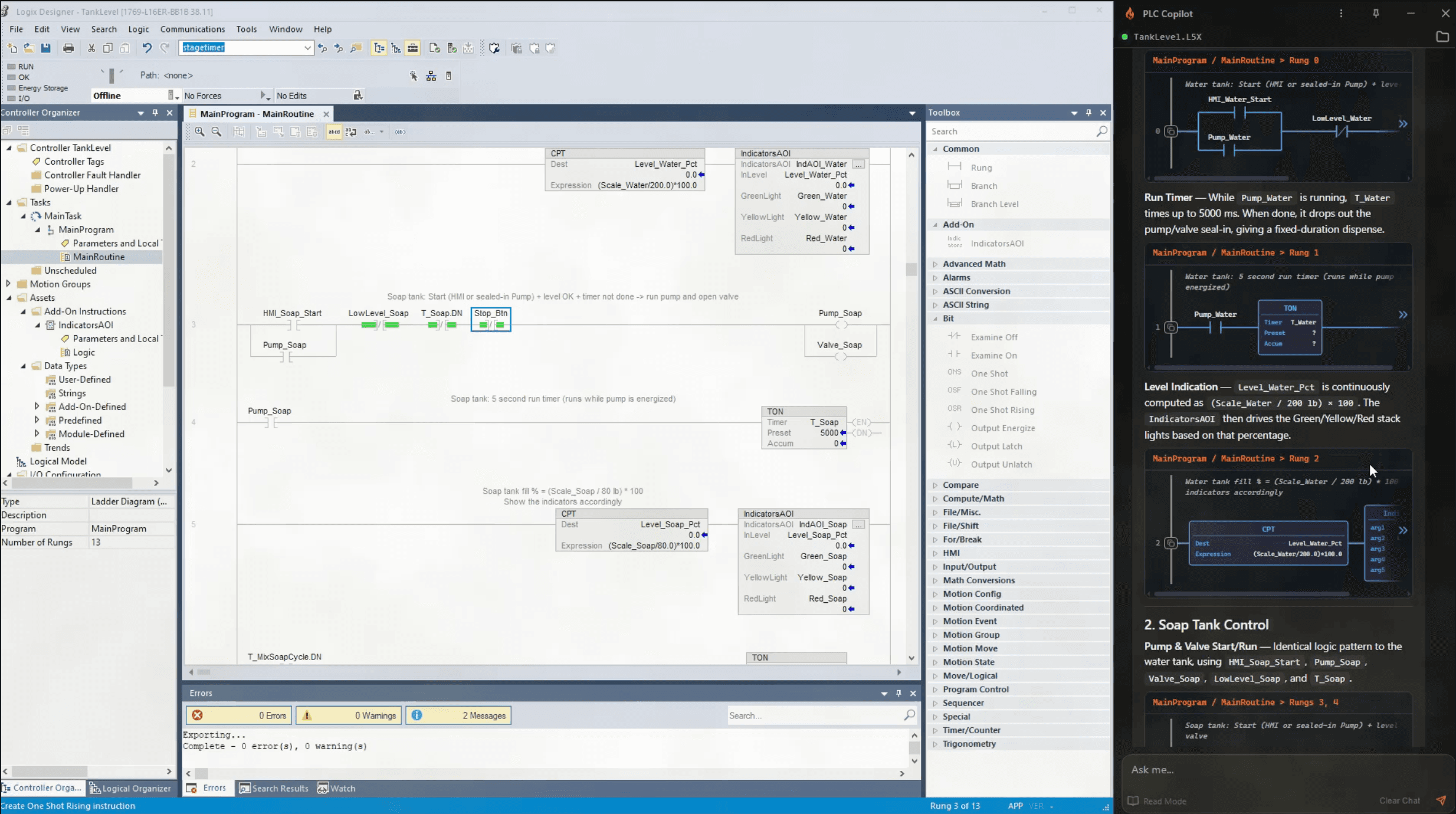
Three steps
A familiar chat interface

Load your project
Point PLC Copilot at your Studio 5000 project file, It reads your file locally and looks at the relevant rungs, tags, and subroutines to answer your questions.
Ask in plain English.
Ask it the way you’d ask the engineer at the next desk. Anything about Routines, rungs, tags, AOIs, UDTs, and cross-references.
Pump_2 is held OFF by an interlock at Rung 847.
Safety input I:3/12 (E-Stop bank 2) is de-energized. The latch on B3:4/2 will not clear until E-Stop is reset and Start_PB is pressed.
Get Answer. Apply.
Get answers tied to the exact rung and tag. View ladder logic displayed in the chat, review PLC Copilot’s suggestions, and apply them in Studio 5000.
If you work in Studio 5000, this is for you.
Automation Engineers
Generate new ladder logic and annotate undocumented code in a fraction of the time.
Controls Engineers
Trace faults, understand inherited logic, and document projects without manual cross-reference hunting.
System Integrators
Get oriented in a new client's project before you touch a single rung.
Three ways it works inside your Studio 5000 project.
Read what your project actually does.
Open any .L5X file and start asking questions about the logic. PLC Copilot reads across routines, rungs, tags, AOIs, and cross-references and gives you cited answers with rung-level references, not summaries.
- Explain what a rung does, what conditions trigger it, and what it controls
- Trace a fault condition back through nested routines to where it is set
- Find every rung that reads or writes a specific tag across the whole program
- Get oriented in an inherited ControlLogix project without the previous engineer
Three minutes on a real
Studio 5000 project.
Your PLC code
stays on your
local machine.
Offline and on-premises options are available. The online plans send chunks of your request to our servers where it is processed. See our Privacy Policy for more details on how we protect your proprietary information.

Private, for all plans
Ladder logic is proprietary. Often under NDA. No one, not even our team, can view or execute your source in context.
Secure by design
The AI works in an isolated local environment, communicating over an encrypted channel to ensure that your code remains private and secure.
Offline option available
Some teams prefer to use their own servers, some can't connect to the internet at all. We can accomodate your needs in our enterprise plan.
Local-first by default
Less time on the code. More time on the problem.
Follow a condition to its source instead of stepping through cross-references by hand.
Add descriptions across an undocumented project without opening each tag individually.
Understand a ControlLogix project before you touch a rung.
Download, open your .L5X, and get your first cited answer.
“It just saved me a boat load of time trying to figure out how someone else's undocumented spaghetti works. Where in the past I would have probably trashed it and rewritten, now I can document the program so others can benefit.”
Controls Engineer, 25 Years of experience in automation
ControlLogix, CompactLogix, and GuardLogix controller families via Studio 5000 .L5X exports.
Version 33 and above. v38 is preferred for the cleanest export workflow.
PLC Copilot operates by default in read-only mode, completely safeguarding your program from any unintended changes. When you generate logic, enhance your tags with descriptions, or craft rung comments, the polished results effortlessly appear in the chat window, ready for you to seamlessly paste into Studio 5000 with full control.
PLC Copilot validates proposed ladder before showing it. Review the rung in chat, copy it, and paste into Studio 5000. For tag descriptions and rung comments, export the Tags CSV. Full setup and walkthrough: How to Use PLC Copilot with Studio 5000
Ask PLC Copilot to generate descriptions or comments for the tags or rungs you need. Export the Tags CSV from the chat, then import it in Studio 5000 under Tools → Import → Tags and Comments. Review every line before you rely on it in production.
Your IP stays secure and no one can read your source code. PLC Copilot is local-first. Fully offline and on-premise options are available on the enterprise plan. See our Privacy Policy for how proprietary code is handled.
PLC Copilot reads ladder (RLL) and Structured Text (ST) routines in loaded .L5X projects. For new logic, it generates and validates ladder for Studio 5000. It can propose ST in chat; you verify and compile in Studio 5000 before deploy.
Generic chat tools guess at tag names and default to Structured Text. PLC Copilot is built for IEC 61131-3 and ladder logic on real Studio 5000 projects. Load your .L5X, get answers tied to actual rungs and tags, review validated ladder in chat, then paste rungs as Neutral Text or import tag descriptions from CSV.
Open your next Studio 5000
project with a copilot.
Studio 5000, ControlLogix, CompactLogix, GuardLogix, and Allen-Bradley are trademarks of Rockwell Automation, Inc. PLC Copilot is an independent product and is not affiliated with, authorized by, or endorsed by Rockwell Automation.