
Migrating RSLogix 500 (SLC 500) and PLC-5 Programs to Studio 5000 Logix Designer

Many industrial plants still rely on legacy SLC 500, MicroLogix, and PLC-5 controllers. When planning a modernization path to ControlLogix or CompactLogix, the central engineering challenge is consistent: how do you migrate existing ladder logic into Studio 5000 without manually retyping thousands of rungs?
This guide walks through Rockwell Automation's documented conversion workflow, the proper sequence of execution, and the critical post-migration validation checks required before commissioning. Every procedure below references specific Rockwell publications to ensure you have verifiable source documentation for your engineering records.
Before you start: Rockwell Automation regularly revises its migration tools and technical documentation. Treat the referenced manuals as authoritative baselines and verify the specific revisions compatible with your installed software version.
TL;DR
- Conversion path: In RSLogix 500 (v12 or later) or RSLogix 5, open the project and select File → Save As → Logix Designer Files (.ACD). This triggers Rockwell’s Logix Designer Export wizard (1756-RM085). Older versions of RSLogix 500 (prior to v12) require the standalone RSLogix Project Migrator tool.
- Export format: The export generates an
.ACDfile, not an.L5X. To generate an.L5Xfile, open the newly created.ACDfile in Studio 5000 Logix Designer and perform a secondary Save As operation. - Automated conversion is incomplete: Rockwell’s conversion engine flags multiple architectural differences for manual review. For instance, every MSG instruction requires manual path verification, Modbus messaging is not natively supported in standard Logix instructions, and specialized instructions (CEM, DEM, EEM) require programmatic validation.
- Pre-migration hygiene: Strip unsupported routines prior to export, and validate logic on a bench controller before deploying to production machinery.
- PLC Copilot: Import the exported
.L5Xto quickly audit converted logic, generate checklists of flagged instructions, refactor legacy data table addresses into descriptive tags, and draft logic modifications.
Workflow at a glance
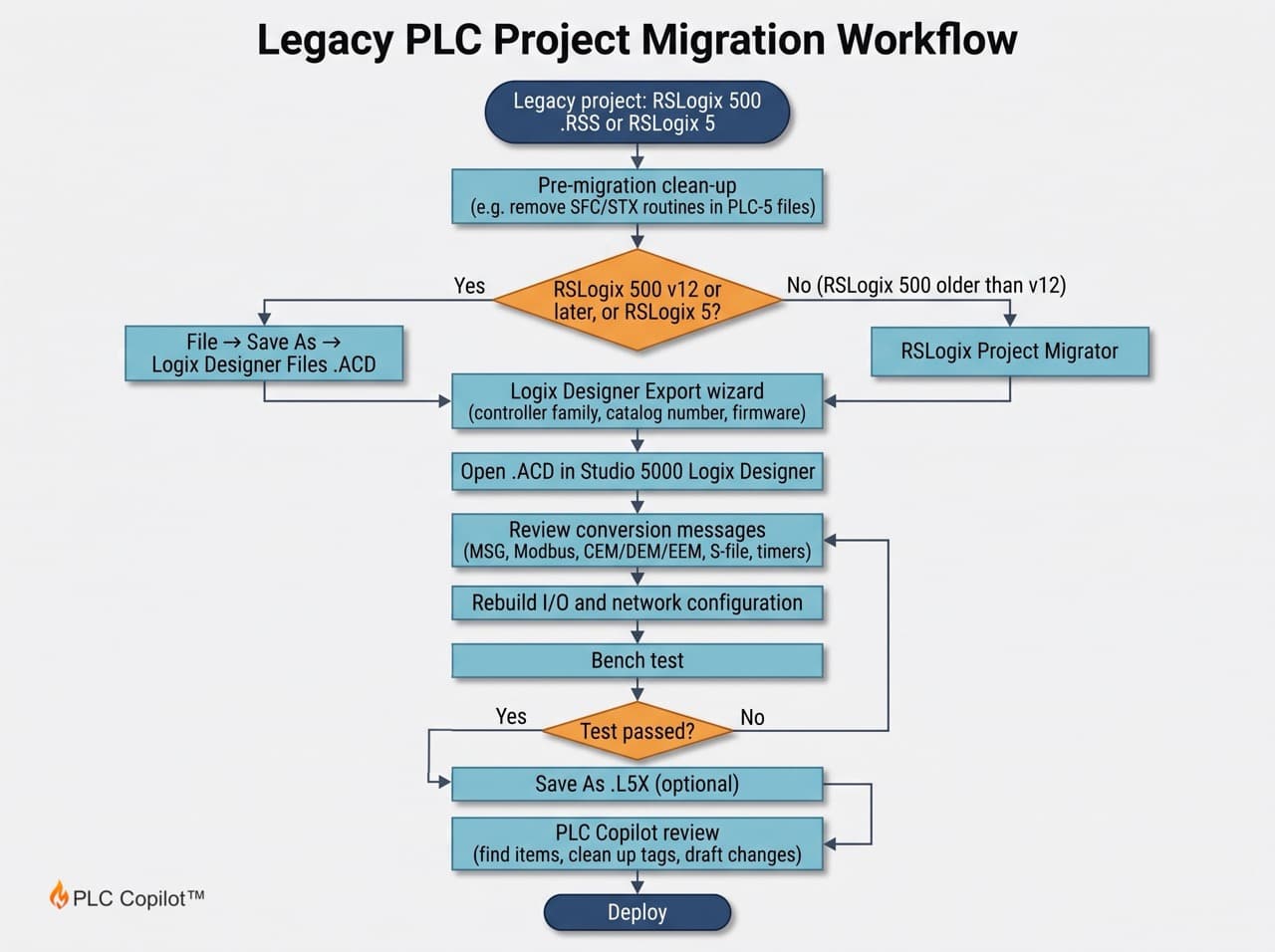
1. Know Your File Types
| File | Created by | Notes |
|---|---|---|
.RSS | RSLogix 500 (SLC 500 / MicroLogix) | Native RSLogix 500 binary file. Documented in Rockwell literature as the primary legacy source project. |
.ACD | Studio 5000 Logix Designer (RSLogix 5000) | Native Logix binary project. This is the direct target output of Rockwell's conversion wizard. |
.L5X | Studio 5000 Logix Designer | Open XML export of a Logix project, generated via Save As in Logix Designer. |
Key distinction: RSLogix 500 cannot directly generate an .L5X file. The migration wizard outputs an .ACD project file. An .L5X is created only after opening that .ACD in Studio 5000 and selecting XML export.
The conversion pipeline is:
RSLogix 500 Project (.RSS) → Logix Project (.ACD) → XML Export (.L5X)
2. Choose Your Conversion Method
Rockwell supports legacy conversion through the Logix Designer Export integrated into legacy programming software. Installations running RSLogix 500 versions prior to v12 utilize the standalone RSLogix Project Migrator utility.
| Software Environment | Conversion Method | Authoritative Rockwell Reference |
|---|---|---|
| RSLogix 500 / RSLogix Micro v12 or later | Integrated Export: File → Save As → .ACD | SLC to CompactLogix Programming Migration (5069-AP001) |
| RSLogix 5 (PLC-5) | Integrated Export: File → Save As → .ACD | Converting PLC-5 or SLC 500 Logic to Logix-Based Logic (1756-RM085) |
| RSLogix 500 prior to v12 | Standalone RSLogix Project Migrator | SLC 500 Hardware Migration Quick Reference (1746-RM003) |
| Both methods (rules & data mappings) | Reference manual for translation logic | Converting PLC-5 or SLC 500 Logic to Logix-Based Logic (1756-RM085) |
Rockwell publication 1756-RM085 defines how legacy data files, execution rules, and instruction sets map into Logix controllers during the export process.
3. Method A: Built-In Converter in RSLogix 500 v12
Follow these steps when converting within RSLogix 500 version 12:
- Open the source
.RSSproject in RSLogix 500 (v12+). - Select File → Save As….
- Set the Save as type dropdown to Logix Designer application Files (*.ACD) and click Save.
- The Logix Designer application Export wizard will launch. Configure the destination project parameters and select Next.
- Select the target controller family (ControlLogix or CompactLogix), specific controller catalog number, and target firmware revision (1756-RM085). Select the exact hardware part number scheduled for installation to ensure memory limits and slot configurations match reality.
- Complete the wizard prompts and open the generated
.ACDfile in Studio 5000 Logix Designer. - Review the complete conversion log before making logic edits. Every warning corresponds to an instruction or tag that could not be 1:1 translated.
Pre-migration requirement: Review Chapter 2 of 1756-RM085 prior to export. For example, legacy SFC and STX routines cannot be processed by the conversion engine and will cause export failures if not removed beforehand.
4. Method B: RSLogix Project Migrator (Older Versions and PLC-5)
When working with RSLogix 500 versions older than v12, use the standalone RSLogix Project Migrator (1746-RM003). Rockwell migration literature (MIGRAT-PP004) outlines this two-stage sequence: export the project structure from the legacy software, then pass the file through the migrator utility to construct an importable file for Studio 5000.
- Locating the tool: Check the Windows Start Menu under the Rockwell Software directory on workstations where Studio 5000 or legacy suites are licensed. If absent, obtain the installer through your local Rockwell distributor or Rockwell Support portal.
5. PLC-5 Programs
Migrating legacy PLC-5 code follows the same architectural framework under 1756-RM085:
- Open the
.PC5project file in RSLogix 5. - Select File → Save as….
- Choose Logix Designer Files (*.ACD) under file type.
- Complete the controller selection wizard detailed in Section 3.
Critical PLC-5 considerations:
- SFC and STX routines: The conversion wizard automatically skips or flags Sequential Function Charts (SFC) and Structured Text (STX) routines. Strip these routines from the legacy project before exporting and rebuild them manually inside Studio 5000.
- Block Transfers (BTR / BTW): Legacy chassis I/O communications using Block Transfer Read/Write instructions do not convert into native Logix operations. Third-party engineering studies (ASEE Technical Paper) document that all BTR and BTW logic must be replaced with ControlLogix MSG instructions or native CIP producer/consumer tags mapped to the modern communications bridge.
- Timer time bases: PLC-5 timers frequently employ 0.01(s) or 1.0(s) time bases, whereas Logix timers operate exclusively in millisecond (ms) increments. Verify all converted timer preset (
.PRE) and accumulated (.ACC) values.
6. After the Conversion: Review Everything
Rockwell’s export wizard is an automated syntax translator, not a complete re-engineering solution. It migrates rungs into Logix format, but leaves legacy data structure quirks in place.
For example, SLC controllers employ status word S:24 as an offset pointer for indexed addressing. Modern Logix execution engines do not support indexed pointer registers in this format. The export wizard instantiates a generic tag named S24 (INT), leaving instructions relying on indexed math non-functional or reading incorrect array elements until restructured.
Critical Verification Checklist
| Technical Item | Rockwell Manual Guidance (1756-RM085) | Engineering Action Required |
|---|---|---|
| MSG Instructions | Every message instruction and associated MESSAGE control tag requires manual validation. | Audit communication paths, target IP/CIP paths, message types, and buffer sizes for modern Ethernet/IP infrastructure. |
| Modbus Messaging | Modbus protocol frames inside standard MSG instructions cannot execute in Logix Designer. | Replace legacy serial MSG instructions with dedicated Modbus TCP/RTU gateway hardware or ProSoft communication modules. |
| Complex Math (CEM, DEM, EEM) | Parameter-dense instructions convert into generic approximations or unsupported rungs. | Validate converted equations against functional machine sequence descriptions. |
Status File Tags (S) | Legacy status words (e.g., scan times, math overflow bits, index pointers like S:24) are converted into flat integer tags. | Replace status word logic with native Logix Get System Value (GSV) or Set System Value (SSV) instructions. |
| SFC / STX Routines | Excluded from the conversion process. | Manually re-author sequential logic using Studio 5000 native SFC or ST routines. |
Secondary Verification Items:
- Data File Mapping: Review how legacy files (B3, N7, T4, C5) mapped into single-dimension Logix arrays (e.g.,
B3[0]of typeDINTorINT). - Physical I/O Addressing: Converted logic maintains legacy address nomenclature (e.g.,
I_1_0). Re-alias or buffer these addresses to your new 1756 or 5069 physical I/O tags. - Timer / Counter Scaling: Inspect every
.PREtag value to ensure millisecond time-base conversions match original cycle requirements. - Math Overflow & Minor Faults: SLC math often ignores overflow bits (
S:5/0). Logix controllers may fault on major/minor numerical overflow errors if math rungs are not clamped.
7. Getting an .L5X for Other Tools
To use external code review tools, automated refactoring utilities, or AI assistants like PLC Copilot, convert the compiled project into an open XML format:
- Open the converted
.ACDfile in Studio 5000 Logix Designer. - Navigate to File → Save As….
- Select Logix Designer XML Files (*.L5X) in the file format dropdown.
- Save the export file to your engineering workspace.
The resulting .L5X document contains a complete, uncompiled programmatic representation of all controller-scoped tags, program tags, data types, and ladder logic routines.
8. Where PLC Copilot Helps
Rockwell’s converter moves your logic across the finish line syntactically, but it leaves your project burdened with legacy technical debt: flat arrays, uninformative tag names (B3_0_1), and unconverted status bits.
PLC Copilot helps to machineodernize your converted Logix projects faster. Audit .L5X files, refactor legacy tags, and clean up technical debt automatically.
Scope Boundaries
What PLC Copilot does once you upload the .L5X:
| Modernization Task | Diagnostic & Refactoring Capability |
|---|---|
| Programmatic Auditing | Scans the .L5X to extract every instance of unresolved MSG instructions, converted status tags (S), and obsolete indexed arrays, outputting an exact rung-by-rung audit checklist. |
| Tag Modernization | Replaces cryptic legacy array tags (e.g., N7_0_1, B3_12_4) with clean, camelCase or snake_case application-specific tags based on legacy documentation. |
| Routine Documentation | Generates descriptive rung comments and module-level summaries to bring converted legacy routines up to company documentation standards. |
| Code Refactoring | Translates converted ladder rungs into modern Logix idioms or IEC-standard Structured Text (ST) blocks. |
| Cross-Platform Translation | Translates validated Logix .L5X routines into Siemens TIA Portal-compatible formats (S7-1200 / S7-1500) for cross-vendor modernization initiatives. |
Converted Logic vs. Refactored Tag Structure
When the native Rockwell wizard exports an SLC project, it preserves legacy data table addresses as generic global tags. This leaves your maintenance team with ladder rungs that obscure the underlying machine intent:
Converted Native Output (Rockwell Wizard Baseline)
In the native export, addresses such as B3:0/1, I:1/0, and O:2/0 are converted directly into flat Logix tags:
       B3_0[1]                 I_1_0                  O_2_0
---------] [--------------------] [--------------------( )---
Disadvantages:
B3_0[1]contains no functional operational description.- Physical I/O points (
I_1_0) remain hard-coded to obsolete chassis slots rather than modern Point I/O or Compact 5000 I/O topologies. - Troubleshooting requires cross-referencing printed electrical prints or RSLogix 500 symbol tables.
Refactored Logix Structure (After PLC Copilot Clean-up)
By uploading the .L5X and providing legacy descriptor tables, the logic is refactored into descriptive, scoped tags with proper rung comments:
  [Rung 0012: Main conveyor drive run command with lube pressure permissive]

  Motor1_Start_Permissive      Lube_Pressure_OK       Motor1_Run_Cmd
------------] [----------------------] [-------------------( )---
Advantages:
- Tag names explicitly reflect process mechanics without requiring external documentation.
- Output commands (
Motor1_Run_Cmd) can be cleanly mapped to standard fieldbus drive assemblies (e.g., PowerFlex over EtherNet/IP) rather than fixed digital output cards.
Example Migration Prompts for PLC Copilot
| Migration Phase | Example Prompt |
|---|---|
| Initial Audit | "Analyze this L5X export and list every MSG instruction, its target tag, and the rung number where it is executed." |
| Status Bit Resolution | "Locate every occurrence of the converted tag S24 and identify where indexed addressing must be replaced with Logix array subscripting." |
| Tag Refactoring | "Here is the legacy symbol export for Routine 4: B3:0/1 = Sys_Rdy, B3:0/2 = Auto_Mode. Generate an updated tag list and rename these variables across all rungs." |
| Logic Modernization | "Refactor Rung 14 from a legacy latch/unlatch (OTL/OTU) coil structure into a standard seal-in start/stop circuit with an e-stop interlock." |
9. Fallback: Manual Logic Rebuild
When automated migration is unfeasible due to file corruption, unsupported legacy hardware, or proprietary firmware revisions, re-authoring logic manually inside Studio 5000 is the remaining path:
- Export Legacy Documentation: Print or export complete RSLogix 500 cross-reference reports, I/O configuration tables, and address comment listings to PDF or CSV.
- Construct Tag Mapping Architecture: Establish a structured tag dictionary mapping legacy addresses directly to modern UDTs (User-Defined Types) and controller tags.
- Reconstruct Ladder Logic: Rebuild routines manually in Studio 5000, taking advantage of modern instructions, add-on instructions (AOIs), and modular program organization.
- Offline Bench Validation: Simulate all logic sequences against an emulation controller (Echo or Logix Emulate) before field commissioning.
10. Hardware and Migration Resources
A control system overhaul requires updating communications, remote racks, and field wiring interfaces in addition to code migration:
- Rockwell Automation Modernization & Migration Solutions
- 1746 to 1769/5069 I/O Conversion Systems (Wiring Harness Kits)
- PLC-5 to ControlLogix Modernization Services
11. Pre-Commissioning Checklist
- Archive complete offline
.RSS/.PC5files and upload running controller values prior to decommissioning. - Determine conversion path based on installed legacy software revision (RSLogix 500 v12 vs. Project Migrator).
- Establish target controller catalog number and firmware major revision compatible with plant standards.
- Run migration export wizard and generate primary
.ACDfile. - Verify that all legacy status tags (
S,S24) and message blocks (MSG) have been resolved. - Remap converted I/O references to physical hardware tags in the I/O configuration tree.
- Export project to
.L5Xand execute tag name modernization and documentation clean-up. - Complete bench testing and I/O checkout using an offline controller or emulation environment prior to physical cutover.
12. References
- Converting PLC-5 or SLC 500 Logic to Logix-Based Logic (Pub. 1756-RM085)
- SLC 500 to CompactLogix Programming Migration (Pub. 5069-AP001)
- SLC 500 Hardware Migration Quick Reference (Pub. 1746-RM003)
- SLC 500 to CompactLogix 5380 Migration Guide (Pub. MIGRAT-PP004)
- Logix 5000 Controllers Import/Export Reference Manual (Pub. 1756-RM014)
- ASEE Technical Study: Converting Legacy Allen-Bradley PLC-5 Systems to Modern ControlLogix