
Which AI Agent is Best for PLC Programming? A Professional Comparison

There is a critical distinction between an answer that sounds convincing and an answer that is validated and correct.
If you are comparing PLC AI tools or a PLC programming AI assistant in 2026, start by splitting the field in two: general coding agents on one side, and purpose-built tools designed for tags, ladder logic, function block diagram, and structured text on the other.
Frontier general purpose agents like Claude Code and the latest GPT models can spin up web apps and Python scripts in minutes. However, they are not built to understand or modify IEC 61131-3 programs. It is fair for a controls engineer to ask why these tools struggle with a simple routine in ladder.
In this article we compare general coding agents against purpose-built tools built for PLC programming.
Operational Technology (OT) is not the same as Information Technology (IT). In OT, the logic runs on fixed scan cycles against real-world input and output (I/O). While in IT, code is typically event-driven: it waits for a request, a click, or a message, then returns a result. General AI models trained on oceans of Python and JavaScript simply did not see enough real ladder projects, vendor instruction sets, or production-grade PLC exports to generate LD reliably.
| Language | PLC Copilot | Claude Code | ChatGPT Codex |
|---|---|---|---|
| Ladder Logic | Strong | Weak | Weak |
| Function Block Diagram | Strong | Weak | Weak |
| Structured Text | Strong | Fair | Fair |
| Python | Fair | Strong | Strong |
| JavaScript | Fair | Strong | Strong |
Most day-to-day PLC work in North America is still ladder logic, not Structured Text. The industry often estimates ladder at roughly 90% of what controls engineers touch in the field. Since generic AI models only saw what were available to them on the internet, their training was skewed towards ST or pseudocode and fall apart on proprietary rung-based generation.
The Specialized: PLC Copilot
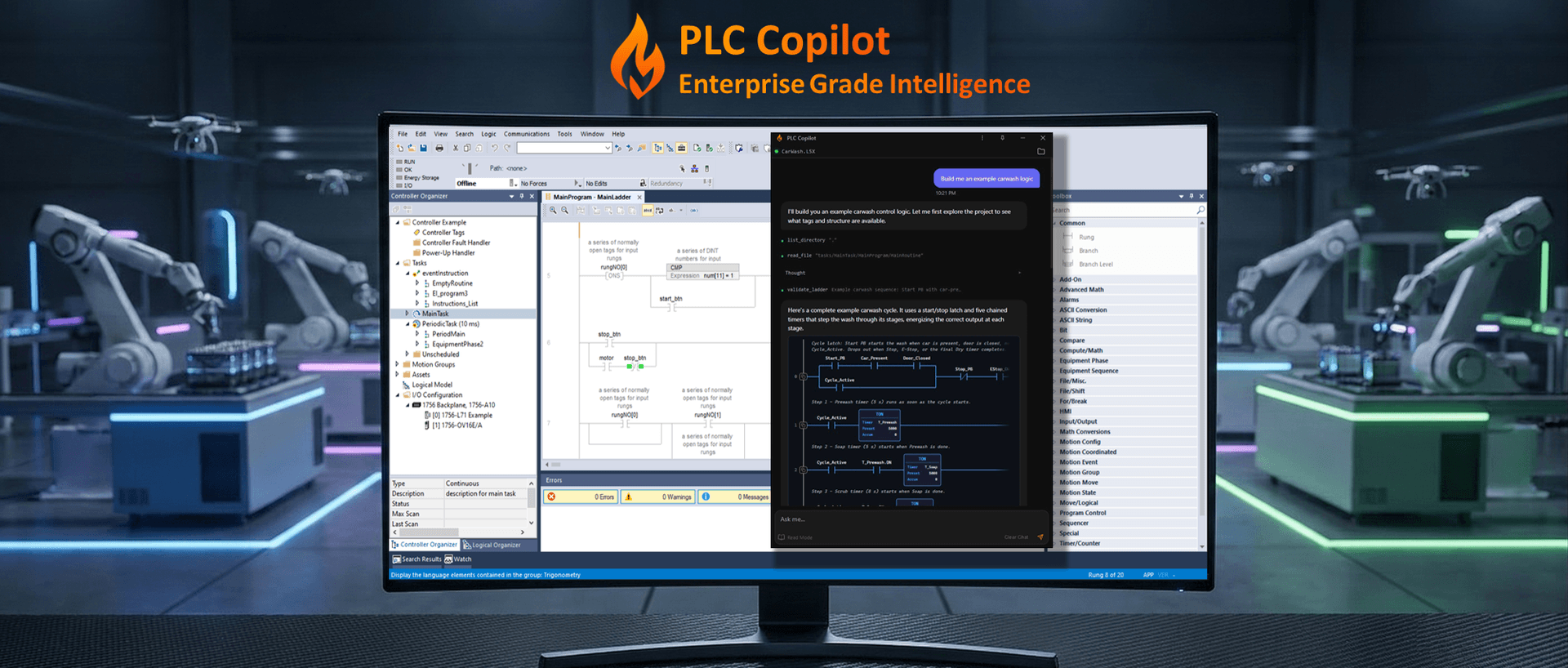
PLC Copilot is built for the day-to-day work of controls engineers: it reads IEC 61131-3 from real projects, explains how the logic behaves, traces conditions across rungs and routines, modifies the logic and supports code review, debugging, and documentation in a familiar chat interface.
Truly understands ladder and function block diagrams
Where general agents stumble on ladder logic (LD or LAD) and function block diagram (FBD), PLC Copilot is designed around it. You can describe a sequence in plain English and get validated ladder proposals grounded in your project tags. The output is validated and ready to drop into your normal Studio 5000 or Productivity Suite workflow, not sit as unusable text in a chat window. The same specialization applies to documentation: rung comments, tag context, and cross-routine explanations tied to how the program actually runs on the line.
Built-in Guardrails
By treating PLC Code as a rigid control language rather than a flexible web script, PLC Copilot provides the safety net that controls engineers require to confidently bring AI onto the plant floor. PLC Copilot ensures the safety and security of your industrial projects through three core guardrails.
-
Security: Protects proprietary infrastructure by offering local-first and fully air-gapped deployment options, allowing engineers to leverage AI securely on the factory floor without an internet connection.
-
Validated Logic: Pre-validates all generated logic against your target IDE rules and existing project tags to prevent the AI from inventing invalid instructions.
-
Human-in-the-loop: Maintains strict oversight by acting solely as an assistant, requiring explicit user approval before any code is modified or exported.
Vendor Agnostic and Cross Functional
PLC Copilot is vendor agnostic, allowing you to develop and maintain code across multiple automation platforms without locking yourself to a single stack. It is trained to understand the exact syntax of your target IDE and the scan-cycle behavior, instruction set, and tag and I/O structure specific to each manufacturer. By deeply grasping these proprietary nuances, the assistant understands the crucial difference between logic that merely "looks right" and code that actually "compiles and runs" safely on the plant floor.

The Generalists: Claude, ChatGPT, and the Codex Models
When we talk about AI for coding, three names usually dominate the conversation: Claude (Anthropic), the GPT series (OpenAI), and the various models powering GitHub Copilot (Codex-based).
The Claude Series
Claude and Claude Code are widely regarded as among the most capable coders in general software. They excel at reasoning through complex web applications. For PLC work, that often means explaining concepts or drafting Structured Text from a paragraph prompt.
However, Claude has a significant blind spot: it lacks deep familiarity with proprietary instruction sets and the rigid XML structures used for project imports in IDEs like Studio 5000 or TIA Portal.
ChatGPT (GPT-class models)
The GPT series remains the default for many engineers experimenting with AI. It has seen more public PLC forum posts than most rivals. For a quick explanation of a TON timer or a basic Boolean sequence, it can be useful.
The downside is confident hallucination: instructions that look plausible but do not exist in your firmware, mixed vendor dialects, and ladder that does not compile without a long edit pass.
GitHub Copilot / Cursor / Windsurf
These coding agents live inside VS Code. For structured text, Ignition Python/Jython, or IT-side automation scripts, they are strong partners. For ladder logic in Logix Designer, TIA Portal, or Productivity Suite, they are largely blind. They cannot see the graphical routines where most PLC programmers spend their day.
Why General AI Often Fails at PLC Coding
1. The Scan Cycle vs. Event-Driven Logic
Most professional programming is event-driven. PLCs are scan-driven. A general AI often writes logic that assumes the code stops and waits for an input (like a while loop), which can cause watchdog timeouts or erratic machine behavior.
2. Syntax and Instruction Hallucination
Every PLC manufacturer has its own dialect. What Rockwell calls a COP instruction, AutomationDirect calls CPD, and Siemens handles via BLKMOV. General AI models often mix these up, producing syntax that looks correct at first glance but fails to compile.
3. Ladder Generation and Training Bias
Because ladder is the dominant language on the plant floor but rare in public training corpora, generic LLMs are consistently weak at generating usable rungs. They gravitate toward ST or loose pseudocode. That is fine for a whiteboard explanation. It is a poor fit when you need importable ladder tied to real tags and interlocks.
4. The Lack of IDE Integration
The biggest hurdle is the "import/export" problem. A general AI gives you text. To get that text into a PLC, you often need to format it as a specifically structured XML file or a CSV with very strict headers. General agents aren't designed to handle the "boilerplate" required to actually get code into the controller.
The Criteria for the Best PLC AI Agent
If you are evaluating an AI tool for your controls engineering workflow, look for these four specific capabilities:
- Platform Awareness: The agent should know the specific instruction set for your hardware (e.g., Productivity Suite vs. Studio 5000).
- Deterministic Reasoning: It should prioritize Boolean reliability over creative "guessing."
- Context Sensitivity: It needs to understand your I/O map and tag-based memory structure, not just a single rung.
- Export Compliance: The best tool is the one that generates code you can actually import into your IDE without 30 minutes of manual re-formatting.
Purpose-Built PLC Agents
This gap in general AI capability has led to specialized industrial agents. Tools like PLC Copilot combine large-model reasoning with an industrial knowledge layer and guardrails for controls engineers.
How to Choose the Right Tool for Your Workflow
The "best" assistant depends on whether you are doing IT-style coding or OT-style controls work. General-purpose models are a poor fit for the latter for the reasons already outlined: they default to event-driven habits that fight the scan cycle, they blend vendor dialects and hallucinate instructions, and they give you loose text instead of ladder and project context that lines up with Studio 5000, TIA Portal, or Productivity Suite. They also cannot see the graphical routines where most PLC programmers actually live.
Purpose-built agents exist to close that gap. They reason with deterministic, scan-based logic in mind, respect instruction sets and tags in context (not one rung in isolation), and align with import-ready workflows and interlock-heavy reality.
| Concern | General AI Agent | Purpose-Built PLC Agent |
|---|---|---|
| Scan cycle & determinism | Often event-driven assumptions | Tuned for scan-based, PLC-safe patterns |
| Ladder / graphical IDE | Mostly pseudocode; weak at LD generation | Ladder-first generation and project context |
| Vendor dialect & instructions | Mixed or invented syntax | Platform- and instruction-set aware |
| Tags, I/O, and routines | Fragmented, single-snippet focus | I/O map and cross-routine awareness |
| Getting work into the toolchain | Plain text; heavy manual reformat | Import-aligned, export-oriented workflows |
| Safety / interlocks | Not a first-class constraint | Interlock and field behavior in scope |
Frequently asked questions
Conclusion
The best agent for PLC programming is not the one with the most parameters. It is the one that respects deterministic, safety-critical factory logic and meets you in the toolchain you already use.
Claude, ChatGPT, and Copilot-class agents are valuable for research and IT-side work. When the job is ladder on a real program, validated before it touches a controller, a specialized PLC agent closes the gap general models keep leaving open.
Comparing tools for your next project? Try PLC Copilot free on a real project export and judge the ladder output yourself.